Step 12: Change the Boundary Type of Baffle
1. Read in the case and data files (
do_3x3_3x3_div.cas.gz
and
do_3x3_3x3_div.dat.gz
).
2. Change the boundary type of
baffle
to
interior
.
Boundary Conditions
baffle
(a) Select
interior
from the
Type
drop-down list.
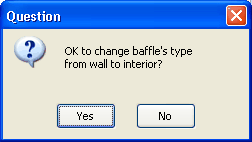
A
Question
dialog box will open, asking if you want to change
Type
of
baffle
to
interior
.
(b) Click
Yes
in the
Question
dialog box.
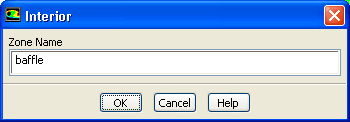
(c) Click
OK
in the
Interior
dialog box.
3. Request another 1000 iterations.
Run Calculation
The solution will converge in approximately 160 additional iterations.
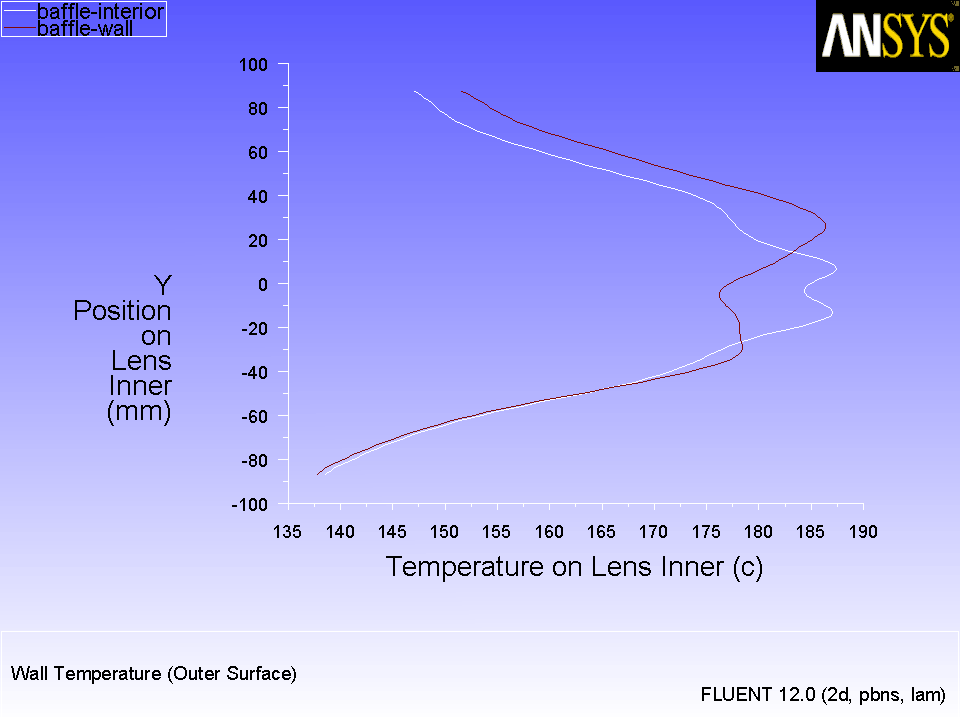
4. Plot the temperature profile for
baffle
interior
.
Plots
XY Plot
Set Up...
(a) Save the file as
do_3x3_3x3_div_baf_int.xy
.
(b) Save the case and data files as
do_3x3_3x3_div_int.cas.gz
and
do_3x3_3x3_div_int.dat.gz
.
Figure 6.11:
Temperature Profile of
baffle
interior
Previous:
Step 11: Make the
Up:
Using the Discrete Ordinates
Next:
Summary
Release 12.0 ©
ANSYS, Inc.
2009-02-09
![[ANSYS, Inc. Logo]](fluentlogo.gif)


 Boundary Conditions

 baffle
 Run Calculation
 Plots
Plots

 XY Plot
 Set Up...
Previous:
Step 11: Make the
Set Up...
Previous:
Step 11: Make the