FAQ of the WARC project administrator in ENEAGRID
What about AFS
What is WARC
What is a WARC project
Where are located WARC projects in ENEAGRID file space
Where are physically located the data of a WARC project
What is the structure of a WARC project
Who creates a WARC project
What the WARC project administrator can do
What are the AFS ACL
What are PTS groups
How ACL are managed
How to access a section of a WARC project area from the Web
What about AFS
AFS is the distributed file system used in ENEAGRID infrastructure.
Basics about AFS can be found in AFS Primer, a local copy of from the site of North Carolina State University.
What is WARC
WARC [Web interface of the ARC Tool] is a Web utility which enable users who are not AFS administrators to issue a subset of the AFS commands reserved to AFS administrators. WARC has been developed in the framework of collaboration CASPUR-ENEA.
WARC is based on ARC [Authenticated Remote Control], a client/server application developed at CERN by R.Többicke to delegate administrator privileges [http://services.web.cern.ch/services/afs/arc.html(WebArchive)].
In ENEAGRID WARC che be accessed at https://hpc-por-s2.portici.enea.it.
What is a WARC project
A WARC project in ENEAGRID is a section of the file space of the AFS cell enea.it which can be used to store software, data, documentation and can be managed using WARC utility.
A WARC project can be created for many reasons:
- to provide a software and data area for a collaborative activity between many users.
- to install a software package that must be made available to all the ENEAGRID users.
- to provide a large and scalable data area for a user who has demanding requests for data space, in the framework of a well defined activity.
- ...
Where are located WARC projects in ENEAGRID file space
A WARC project has a name which is unique in ENEAGRID.
WARC projects are usually located at the following paths in AFS file space:
- /afs/enea.it/project/... if the WARC project is mainly dedicated to a collaborative activity.
- /afs/enea.it/software/... if the WARC project is dedicated to a specific software package.
The reason for this double access path is due to the fact that WARC project can also be used to manage sections of complex collaborative projects.
In that case the access path /afs/enea.it/arcproj/... is still available, while their access path through /afs/enea.it/project/.. can be found inside other projects directories. This tailoring is done by hand by an AFS system administrator in setting up the structure of the area for a complex project.
It must be stressed also that not all the subdirectories of /afs/enea.it/project/ and /afs/enea.it/software/ correspond to WARC project area.
Where are physically located the data of a WARC project
AFS File system is based on AFS volumes. The AFS volume is the container where AFS file system stores its data and usually its existence is better known to administrators than to end users. However, when the physical location of the data is relevant for the user, he must be aware of the volume concept. Obviously there is a strong performance advantage if the computational resources selected by the user are close to the site where data are located.
AFS offers a mechanism to facilitate the replica of data in different geographical locations.
When a WARC project is created, one of the sites of ENEAGRID [Bologna, Brindisi, Casaccia, Frascati, Portici, Trisaia] must be selected as the main site of the project. The AFS file server on this site contains the Read-Write [RW] AFS volumes of the project.
Read-Only [RO] replica can be created on other sites where fast access to the project data is also required.
The AFS operation which align the content of RW and RO versions of an AFS volume is called Volume Release.
When an AFS volume has a RO replica, the standard file system path provides the access the content of the RO volume.
If the user wants to modify the content, he must instead access the RW volume and that is done by using a path with a dot before the AFS cell name:
/afs/enea.it/project/project_name/..
- is the RO replica
/afs/.enea.it/project/project_name/.. - is the RW volume
/afs/.enea.it/project/project_name/.. - is the RW volume
After having modified the content, the user must "release" the volume to have the modifications also on the RO copy.
What is the structure of a WARC project
A WARC project can be contained in many AFS volumes.
The main volume project is mounted at the project entry point in the AFS file system.
Other subproject volumes can be created and mounted inside the main project.
- e.g. the project prog1 with subprojects subproja and subprogb:
- /afs/enea.it/project/proj1
- /afs/enea.it/project/proj1/subproga
- /afs/enea.it/project/proj1/subprogb
- The maximum size for an AFS volume should not exceed ~20 GB to permit a flexible administration of the AFS system; if the project requires more than 20 GB, the creation of subprojects is strongly suggested.
- While the main project volume has always a RO replica, each subproject can optionally have a RO replica, depending on users needs.
http://www.afs.enea.it/project/project_name
The "html" directory can be created as a WARC subproject. In that case, if the subproject has a RO replica it is possible to control the update of the web pages: the user modifies the RW copy and when all the modifications are completed the release of the volume is performed. As the web server publishing the web pages has access only to the RO copy, the consistency of the web content is assured: only the final version is pubblished on the Web.
Who creates a WARC project
When a user requires to have a new WARC project area, he must contact the AFS administrator of his site, who is responsable of the AFS space allocation.
The AFS administrator creates the project on the basis of the user requirements and assign to the user the authority of WARC project administrator.
The user requirements:
- the name of the project (unique in ENEAGRID)
- the size of the data space
- the needs about the project structure:
- subprojects [an html section is required?]
- volume replication: where?
What the WARC project administrator can do
The tasks of the WARC project administrator:
- The WARC project administrator has the complete administration
authority on user access to the project files space: he must set the ACL [Access Control List]
for all the directories of the project
data area.
- The WARC project administrator can create project specific PTS Group [Protection Server group] for an easy administration of the user access.
- The WARC project administrator can add/remove/list users to the
project specific PTS groups.
- The WARC project administrator can release the volumes belonging
to the project. The release is performed by a background process and a
message is provided to warn the project administrator if a previous
release is still in progress.
- The WARC project administrator can assign to other users the authority of WARC project administrator for his project.
- fs
setacl (if the operation must be performed on a tree of directories, use the command afs_recursive_change_acl)
- fs
listacl
|
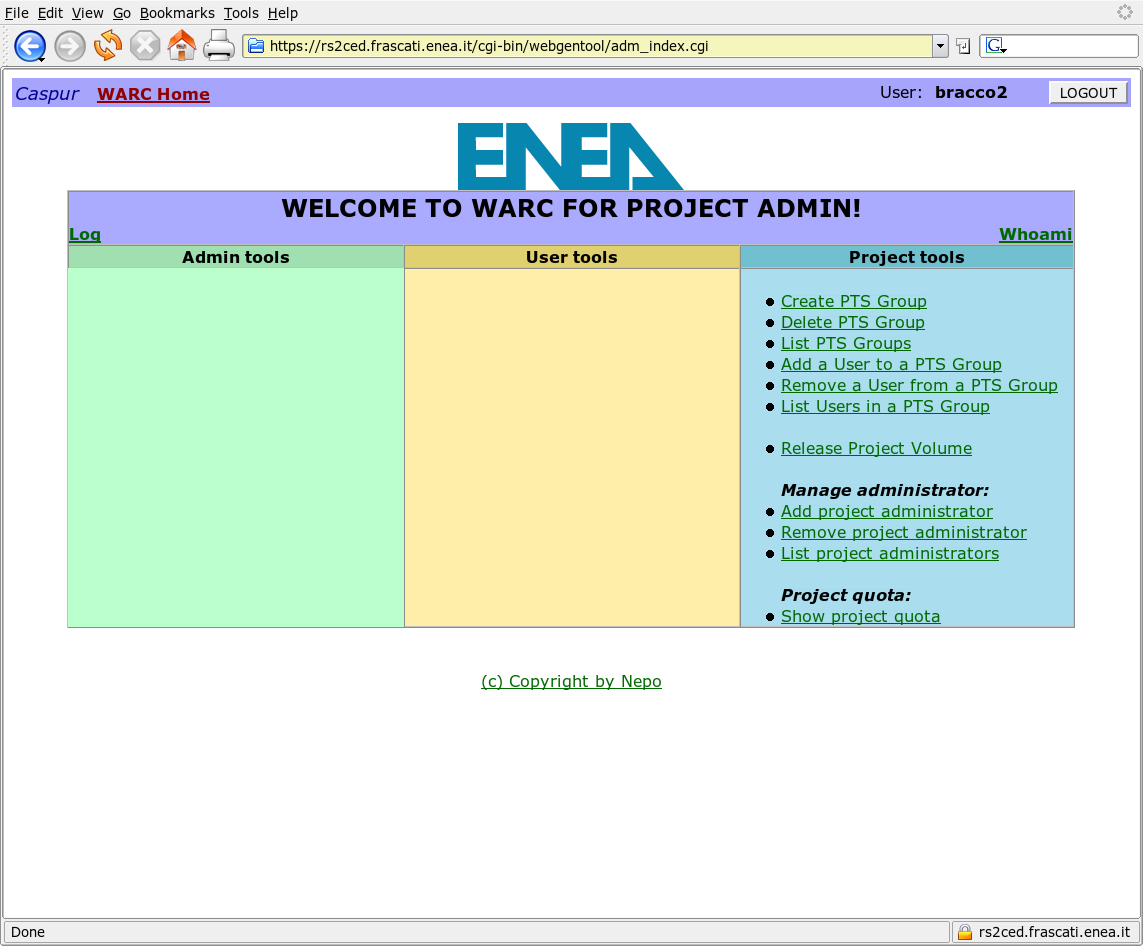 |
The Project administrator must provide his AFS user and password to authenticate himself to the site.
What are the AFS ACL
A WARC Project administrator must know the details of AFS ACL, otherwise he can not control properly the access of users to the area of his project.
The AFS Documentation provide the full description of ACL meaning and syntax: The AFS ACL Permission
Here a short reminder is provided.
AFS uses access control lists (ACLs) to determine who accesses information in AFS file space.
An ACL exists for every AFS directory and specifies what actions different users / groups can perform on that directory and its files.
| Access | Meaning |
| r | read (and copy) the contents of files in the directory. |
| l | look to list (ls) directory and look at the ACL. You must have l access to use other access rights, e.g., to read you must have rl. |
| i | insert files or subdirectories (create new files, move existing ones). |
| d | delete files or subdirectories from the directory. |
| w | write or edit the contents of files in the directory. |
| k | lock. Sets an advisory lock on a file. |
| a | administer to change access in the
ACL. |
Aliases have also been set up for common levels of access, i.e.,
read, write and administer.
These can be used in place of the letter
abbreviations.
| Alias | Access | Meaning |
| read | rl | read and look |
| write | rlidwk | all rights but administer |
| all | rlidwka | full administrative rights |
| none | remove all rights |
AFS authorization mechanism is different from the standard UNIX file-protection mechanism and its access control is directory based.
Three UNIX mode bits --read, write, and execute-- protect each file, while the described seven AFS access rights protect the directory in which the file resides. As a result, individual UNIX file permissions do not mean very much in AFS-defined directory space (except for the execute bit x).
In AFS, users assign and manage access to directories, not to individual files: if a file is moved to a directory where the access permissions are different, the file will inherit those new settings.
What are the PTS groups
A PTS Group is a defined list of individual users that can be placed on the ACLs of the directories.
Through groups, a user can grant the same access rights to a number of people at once.
Instead of adding and removing individuals separately to ACLs, the user can add or remove them as a group.
When a WARC project [project_name] is created on a site [site] four PTS groups are also automatically created:
projadmin:site-project_name
projadmin:site-project_name-write
projadmin:site-project_name-read
projadmin:site-project_name-insert
projadmin:site-project_name-write
projadmin:site-project_name-read
projadmin:site-project_name-insert
The ACL of the project main directory is initialized with the following assignement:
| PTS group name |
access |
| projadmin:site-project_name | rlidwka |
| projadmin:site-project_name-write | rlidwk |
| projadmin:site-project_name-read | rl |
| projadmin:site-project_name-insert | rli |
The group projadmin:site-project_name contains the list of the users who are project administrators while the other three groups are available to grant other users the write, read and insert access mode.
WARC permits also to create other PTS groups, specific for the project, with a generic name syntax:
projadmin:site-project_name-group_name
where the group_name must be choosen to be mnemonic for its utilization:
e.g. "projadmin:site-project_name-whtml" can be used to contain all the users with the right to update the html pages of the project.
By a proper definition of the project PTS groups and of the directory ACL, the project administrator can control accurately the access to any section of the project area.
It must be stressed that the association between the PTS group and the access mode is fixed by the ACL assignement, so the project administrator must carefully mantain the consistency of the set-up. In other words it is perfectly legal for the project administrator to assign the access "write" to the group called projadmin:site-project_name-read but this would result in a very confusing situation.
WARC interface enables the project administrator to add and remove user to/from a project PTS group and permits also to have the list of users belonging to a group.
Some predefined groups are available and can be used also by the WARC project administrator:
| PTS
Group |
The
members |
| system:anyuser | any user of the system, even
without an AFS token (e.g. unauthenticated web access) |
| system:authuser | any user with a valid token |
| system:administrators | the AFS adminstrators |
| system:backup | the list of server performing
the backup |
The ACL to be set for a Web access to a WARC project are described in a later section How to access a section of a WARC project area from the Web
How ACL are managed
AFS has its own special commands for setting permissions for individual access and access by groups.
To grant someone access to a directory, the user who has the administrator right on the directory, must set access to it with the fs sa command i.e. fs setacl
fs sa directory userid access
fs sa directory group access
while the status of an ACL is displayed by the command fs
listacl
fs la path-to-directory
When the user grants access to a directory, he also grants the same access to all new subdirectories created under it.
New subdirectories inherit the ACL of the parent directory.
However, already existing subdirectories do not inherit the parent directory's ACL if it is changed.
As a result, existing directory ACLs must be changed one by one.
Or, use the following command (on Unix/Linux systems) to change all the subdirectory ACLs at once.
find .
-noleaf -type d -exec fs sa {} username
access >>& /dev/null \;
or
find . -noleaf -type d -exec fs sa {} group access >>& /dev/null \;
The script afs_recursive_change_acl can be used to perform this operation.How to access a section of a WARC project area from the Web
As it has been described above in the "What is the structure of a WARC project" if the main project folder contains a "html" directory, its content is published at the URL http://www.afs.enea.it/project/project_name.
The ACL of the "html" directory must be set with "read" access for the group system:anyuser.
A restricted and authenticated access can be setup for a subdirectory of the "html" folder following the instruction available in: "How to configure AFS file space for web access, including user restricted area"