Step 3: Models
 Models
- 1.
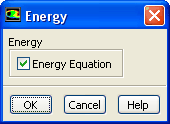
Enable the energy equation.
 Models

 Energy
 Edit...
- 2.
Select the k-omega SST turbulence model.
 Models

 Viscous
 Edit...
- (a)
Select
k-omega (2eqn) in the
Model list.
- (b)
Select
SST in the
k-omega Model group box.
- (c)
Click
OK to close the
Viscous Model dialog box.


 Previous:
Step 2: General Settings
Previous:
Step 2: General Settings
Up:
Modeling Transient Compressible Flow
Next:
Step 4: Materials
Release 12.0 © ANSYS, Inc. 2009-02-09 ![[ANSYS, Inc. Logo]](fluentlogo.gif)